
I always use multiple skype one for myself and other for my office staffs. And sometime I have to remain offline for some people while at some other instance for some other people. So this is how I use multiple skype simultaneously. This method works in windows as well as in linux.
The method is simple we create a shortcut to skype with /secondary switch.
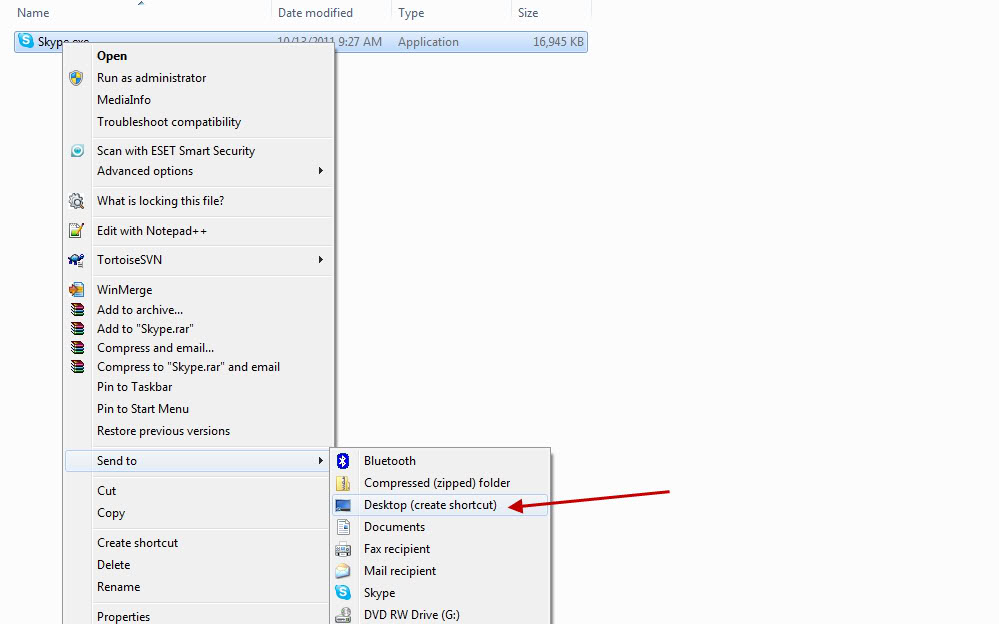
Step 1. Goto the folder where skype is installed.

Step 2. Right-Click on the skype.exe, then click in send then click in Desktop.
This will create the shortcut of skype in desktop.
Step 3. Now, right-click on the shortcut of skype, that was newly created on the desktop. Then select shortcut tab then in target textfield goto the last and then enter /secondary as shown below.
“C:\Program Files (x86)\Skype\Phone\Skype.exe” /secondary
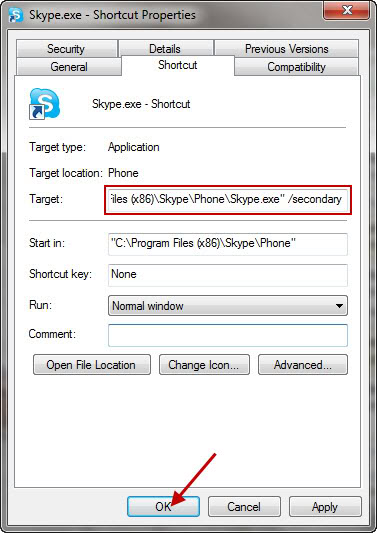
Step 4. That’s all.
Now whenever you double click on the skype shortcut, a new window of skype will be shown where you can login as usual.
Happy Skyping.
Nice Samundra .. liked it 🙂
I am glad you liked it 🙂
Thanks RamKrishna !! I feel glad you found it useful.
good sharing is caring….la thik cha aaba ta maile pani jane…hehehehe
Glad !!! You got it 😀
Mero objective nai sabaile thaha paos bhanne ho 🙂 Sharing knowledge extends our knowledge as well.